

Onboarding businesses
Two layers of onboarding
- Organization onboarding - a one-time KYB process Fuze runs on your own company with your integration team, producing the API keys or OAuth credentials used to authenticate requests.
- Business customer onboarding - every business you bring onto your platform is created as a User and must pass its own KYB check before it can hold a wallet, account, or send a payment.
See Users for the full data model behind every business record.
KYB and the role of UBOs
KYB (Know Your Business) is the only onboarding check Fuze runs on your business customers: incorporation documents, beneficial ownership, and corporate resolutions. There is no separate individual onboarding path.
As part of a business's KYB, its UBOs (Ultimate Beneficial Owners) and authorized signatories complete their own identity check, such as an ID document and sometimes a liveness check, so Fuze can confirm who ultimately owns and controls the business. This step only supports the business's KYB, it never creates a standalone consumer profile. Full document categories are listed in KYC/KYB.
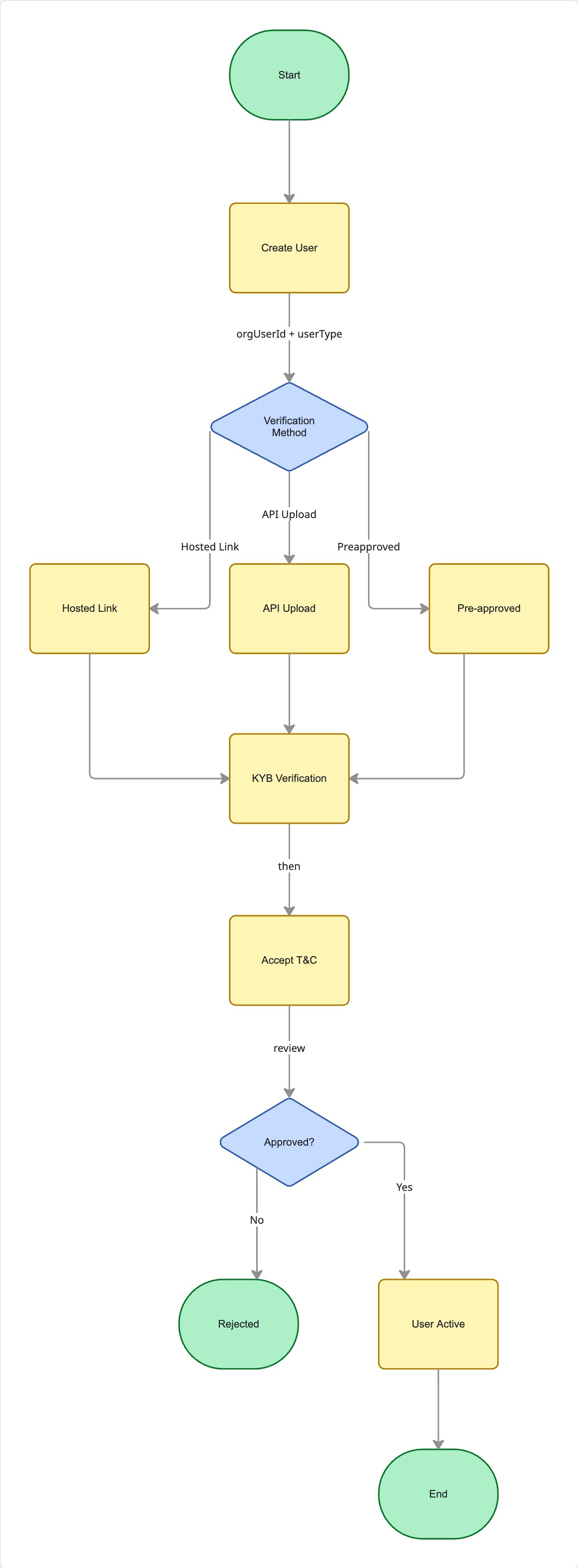
A user can transact only once two independent flags are both true: kyc (identity and business verification passed) and tnc (Terms & Conditions accepted, a separate Update user TnC status call). A user sits in PENDING until both are satisfied, then moves to ACTIVE.
A rejected user is terminal for that identifier - onboard a genuinely eligible business again with a brand-new orgUserId.
Choosing an onboarding method
-
Fuze-hosted (link-based) - redirect the business to a
kycLink; Fuze collects its documents and reports back via webhook. Lowest engineering lift.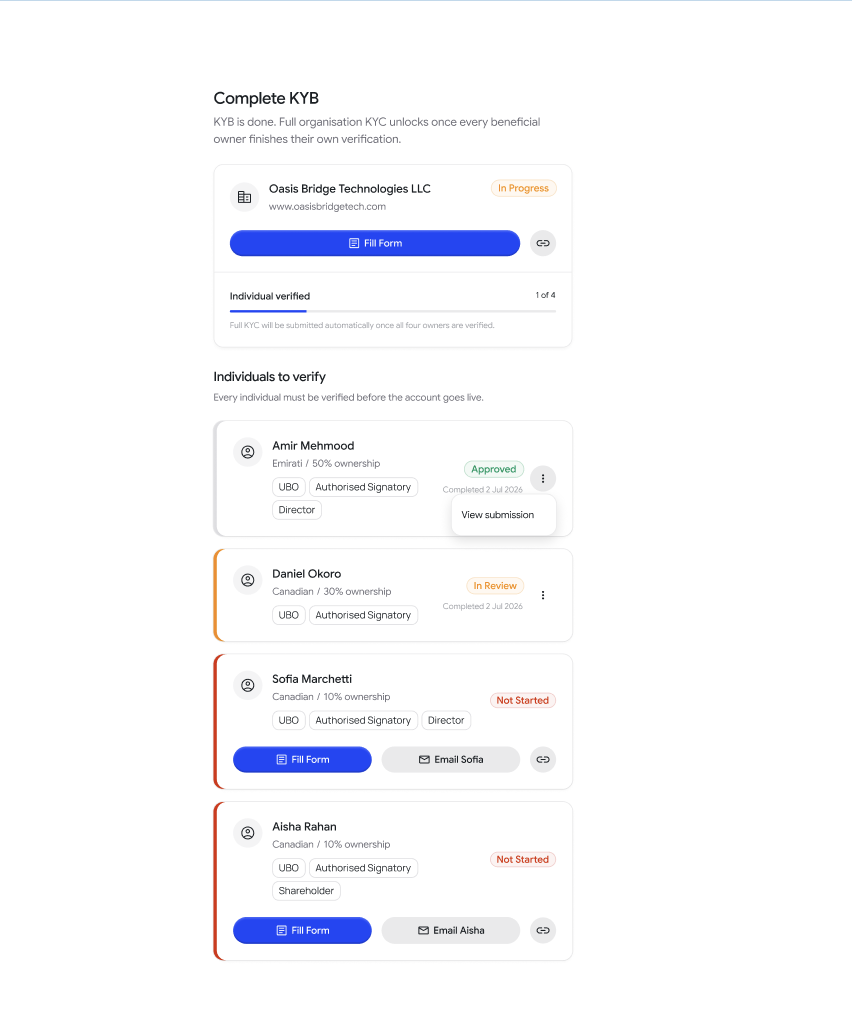
-
API-driven or hybrid - you collect the business's data and documents in your own UI and submit them via Upsert user KYC. Best for a fully white-labeled experience.
-
KYC Reliance - for accredited, regulated institutions that have already run compliant KYB on the business themselves. Fastest go-live.
Creating and activating a business user
- Call Create user with a unique
orgUserIdanduserType; Fuze returns the user record and, for hosted or hybrid flows, akycLink. - Route the business to verification: redirect to the
kycLink, submit documents via Upsert user KYC, or submit your attestation for reliance. - Record consent with Update user TnC status once the business has accepted.
- Listen for webhooks:
CREATE,KYC_PENDING,KYC_COMPLETEDorKYC_REJECTED, thenUPDATEonceuserStatusflips toACTIVE. See User Lifecycle & Webhooks for event details. - Use Get user or List users any time you need a synchronous status check instead of, or alongside, webhooks.
The API's userType field only exposes two values: INTERNAL for your own organization's treasury or settlement accounts, and CONSUMER for every business customer you onboard as an end user. In this guide, a CONSUMER user is always a business, never a natural person.
Handling Requests for Information (RFI)
Compliance sometimes needs more before it can approve or reject a submission - a clearer document, proof of address, or extra detail about the business. Fuze surfaces this as an RFI state on the user's kyc flag.
Listen for the RFI webhook, or poll Get user, then collect the missing document via Get file upload link and resubmit through the same path you used originally. For higher-risk business relationships, Fuze may also request enhanced due diligence via Update EDD tracker. Fuze moves the business forward to a completed or rejected state once it reviews the new information.
Best practice: treat onboarding as a state machine
Persist userStatus, kyc, and tnc locally and update them from webhooks, make webhook handlers idempotent, and gate access to wallets, accounts, and payments on the business's current state rather than assuming a fixed order of events.
{
"orgUserId": "biz_9f3e2a7c","userType": "CONSUMER",
"userStatus": "ACTIVE","kyc": true,
"tnc": true}
Updated about 1 month ago