

Creating accounts
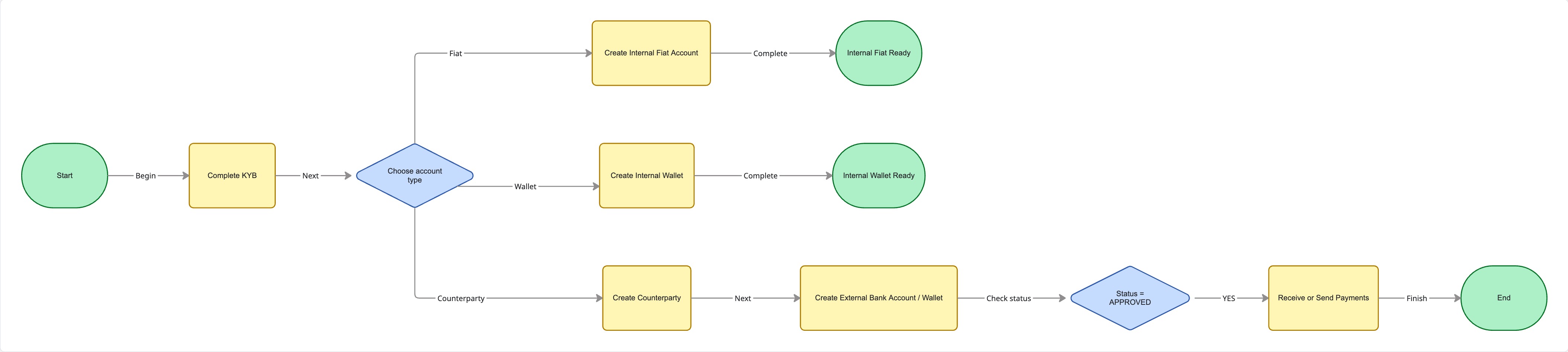
Once a business has successfully completed KYB, the next step is to provision the accounts where it can hold, receive, and move funds.
Fuze supports three types of accounts:
- Internal Fiat Accounts (Named IBANs) – Receive and hold fiat currencies.
- Internal Crypto Wallets – Hold crypto assets issued by Fuze.
- External Accounts & Wallets – Saved payment destinations for sending or receiving funds.
Each serves a different purpose depending on whether the funds stay within the business or move to an external beneficiary.
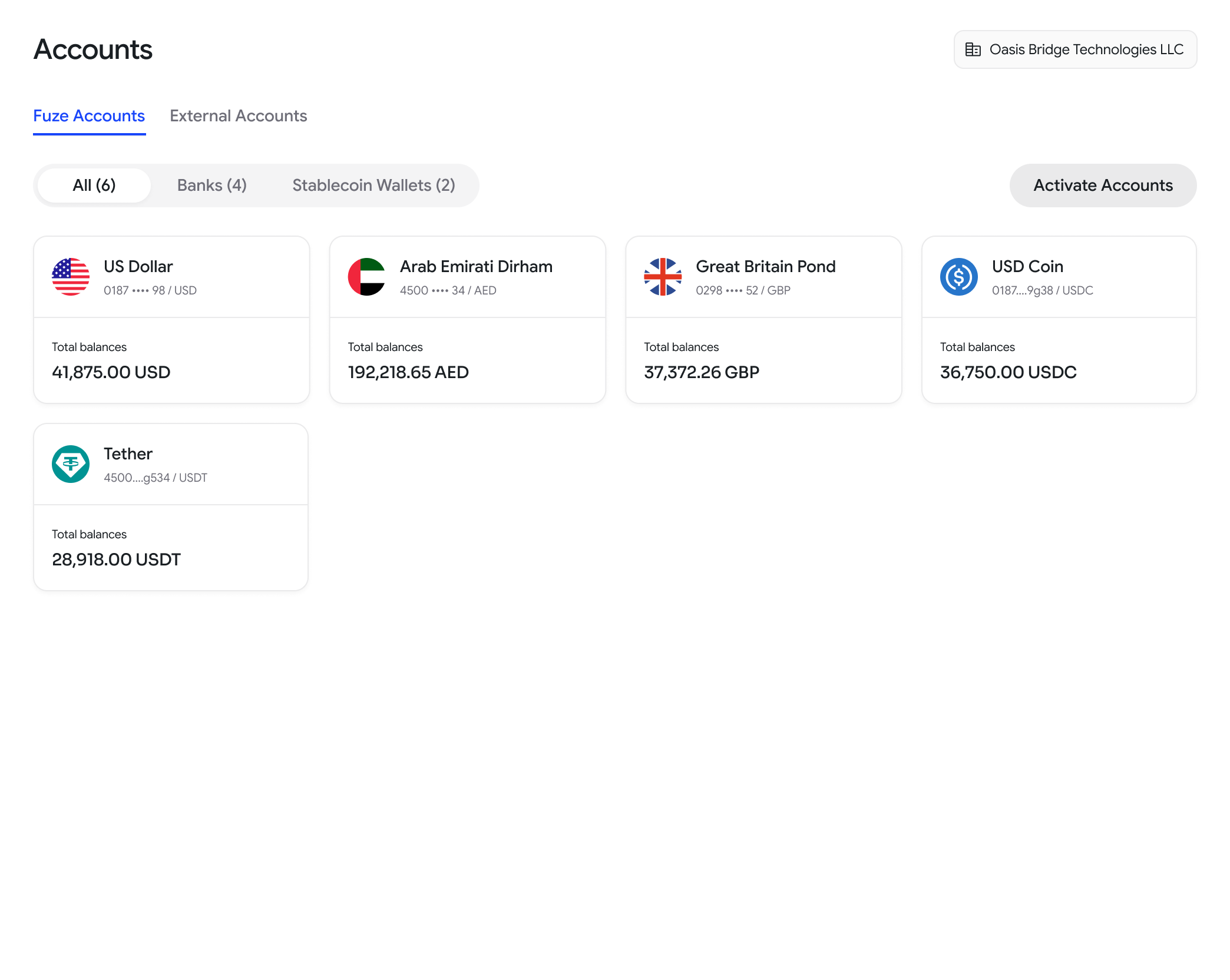
Internal Fiat Accounts (Named IBANs)
An internal fiat account provides a business with a dedicated bank account and IBAN. Every incoming transfer to that IBAN is automatically associated with the correct business, eliminating the need for payment references or manual reconciliation.
When should you create one?
Create an internal fiat account when a business needs to:
- Receive fiat payments
- Hold balances in supported currencies
- Collect customer payments
- Send outbound bank transfers
Each account is issued in a specific currency.
Before you begin
Before creating an account:
- Ensure the business has successfully completed KYB.
- Verify that the requested currency is supported using the List Account Currencies API.
Creating an account
Call the Create internal account. with the business (orgUserId) and the desired currency.
The account is not immediately usable. Wait until its status becomes APPROVED before allowing deposits or initiating payments.
An approved account includes details such as:
- Account Number
- IBAN
- Beneficiary Name
- Bank Name
- Currency
These details can then be shared with customers or counterparties for incoming transfers.
{
  "code": 200,
  "error": null,
  "data": {
    "orgUserId": "sherlock_holmes",
    "accountId": "123e4567-e89b-12d3-a456-426614174000",
    "status": "APPROVED",  //make sure this is APPROVED before
    "owner": "FIRST_PARTY",
    "accountType": "INTERNAL",
    "createdAt": "2023-10-01T00:00:00Z",
    "updatedAt": "2023-10-01T00:00:00Z",
    "accountDetails": {
      "accountNumber": "1234567890",
      "beneficiaryName": "Sherlock Holmes",
      "bankName": "Bank of Baker Street",
      "bankCountry": "GB",
      "bankCity": "London",
      "currency": "AED",
      "type": "iban",
      "iban": "AE210860000006320984516"
    }
  }
}
Wallets
An internal or external crypto address for holding balances or routing deposits and withdrawals on behalf of a business. Create an internal wallet with Create internal wallet; before sending to or accepting from an external wallet, run it through Screen external wallet.
- Internal Wallets: Create an internal wallet for a user or a user's counter-party. The wallet will be used to deposit crypto funds for the user.
Creating an internal wallet
Call the Create Internal Wallet API.
Depending on your use case, the wallet can belong to:
- the business itself (
FIRST_PARTY), or - one of its registered counterparties.
The response contains:
- Wallet Address
- Blockchain
- Network
- Currency
- Wallet Purpose
- Approval Status
Only wallets in the APPROVED state should be used for deposits or withdrawals.
{
  "code": 200,
  "error": null,
  "data": {
    "orgUserId": "sherlock_holmes",
    "counterPartyId": "john_watson",
    "walletId": "123e4567-e89b-12d3-a456-426614174000",
    "walletType": "INTERNAL",
    "owner": "FIRST_PARTY",
    "purpose": "DEPOSIT_SOURCE",
    "status": "APPROVED",
    "createdAt": "2023-10-01T00:00:00Z",
    "updatedAt": "2023-10-01T00:00:00Z",
    "walletDetails": {
      "address": "0x1234567890abcdef1234567890abcdef12345678",
      "currency": "USDC",
      "chain": "ETHEREUM",
      "network": "MAINNET",
      "memo": "Wallet for Sherlock Holmes",
      "nickname": "wallet001"
    }
  }
}- External Wallets: Create an external wallet for a user's counter-party. The wallet will be used to deposit or withdraw crypto funds for the user.
Call the Create External Wallet API using:Creating an external wallet- the business (
orgUserId) - the registered counterparty (
counterPartyId) - wallet address
- blockchain
- network
- currency
Once approved, the wallet can be reused across future crypto transfers without requiring the address to be entered again.
{ "code": 200, "error": null, "data": { "orgUserId": "sherlock_holmes", "counterPartyId": "john_watson", "walletId": "123e4567-e89b-12d3-a456-426614174000", "walletType": "EXTERNAL", "owner": "THIRD_PARTY", "purpose": "WITHDRAWAL", "status": "APPROVED", "createdAt": "2023-10-01T00:00:00Z", "updatedAt": "2023-10-01T00:00:00Z", "walletDetails": { "address": "0x1234567890abcdef1234567890abcdef12345678", "currency": "USDC", "chain": "ETHEREUM", "network": "MAINNET", "memo": "Wallet for John Watson", "nickname": "wallet001" } } } - the business (
External Bank A/C
A saved external bank account, owned by your business or a business customer, that you can pay out to. Register a counterparty first with Create counter-party, then call Create external account. Double-check the beneficiary name and routing details, since mismatches are a common cause of returned payouts.
{
  "code": 200,
  "error": null,
  "data": {
    "orgUserId": "sherlock_holmes",
    "counterPartyId": "john_watson",
    "accountId": "123e4567-e89b-12d3-a456-426614174000",
    "status": "APPROVED",
    "owner": "THIRD_PARTY",
    "accountType": "EXTERNAL",
    "createdAt": "2023-10-01T00:00:00Z",
    "updatedAt": "2023-10-01T00:00:00Z",
    "accountDetails": {
      "accountNumber": "1234567890",
      "beneficiaryName": "John Watson",
      "bankName": "Bank of Baker Street",
      "bankCountry": "GB",
      "bankCity": "London",
      "bankAddressLine1": "221B Baker Street",
      "bankAddressLine2": "Marylebone",
      "bankState": "Greater London",
      "bankPostalCode": "NW1 6XE",
      "currency": "AED",
      "type": "iban",
      "iban": "AE210860000006320984516",
      "nickname": "John"
    }
  }
}
Managing accounts
After an account or wallet has been created, it can be retrieved or monitored at any time.
Use the following APIs to:
These endpoints allow you to:
- check approval status
- retrieve banking or wallet details
- display saved accounts to users
- verify whether an account is ready to receive or send funds
{
"accountId": "acc_7c1e4b2a9f3d","owner": "FIRST_PARTY",
"accountType": "INTERNAL","status": "APPROVED",
"accountDetails": { "iban": "GB29NWBK60161331926819", "currency": "USD" }}
Updated about 1 month ago